

Photo 2026 05 06 18 14 34
Photo 2026 05 06 18 20 01

Browser Access

Play Palace of Chance Casino games directly through your mobile browser without downloading apps.

Palace of Chance Casino app on mobile

Browser-Based Mobile Platform

We work entirely through mobile browsers, not through native apps. Web applications run through your internet browser and do not require installation on your device. There is no need to download anything from Google Play or the App Store. In Canada, you simply open Safari, Chrome, Firefox, or Edge on your phone or tablet and log in.

Our site recognizes your device type and reshapes the interface for touch control. It is built for Android and iOS devices, plus Windows Mobile. On older systems some elements may display incorrectly or certain functions may not appear at all.

How fast games load depends on your connection quality and the hardware in your device. WiFi is usually more stable for longer sessions, but regular mobile data works fine too. It is important to keep an eye on your data balance so your provider does not charge extra by surprise.

Quick tip: For the best user experience, ensure your mobile browser is updated to the latest version and check connection quality before starting a gaming session.

Technical Requirements

JavaScript has to be enabled in your browser for the casino to work correctly. If it is off, pages may stay blank or buttons simply do nothing. Cookies also need to be allowed so we can keep you logged in and maintain your session.

Browser compatibility overview:

BrowserMinimum VersionRecommended
Safari10.014.0+
Chrome60.090.0+
Firefox55.085.0+
Edge79.095.0+

Screen resolution mostly affects how sharp everything looks. A 720p display is enough to show all controls and menus properly. On 1080p and higher you simply get cleaner graphics. Games adjust themselves to your screen so you should not need to scroll sideways.

Account Login and Recovery

To log in on mobile, tap the login button in the upper right corner. A panel opens with fields for your username and password. Sessions may close automatically after a period of inactivity, so you may need to sign in again. The “Remember Me” checkbox helps keep you signed in longer, but on shared or public devices it is safer not to use it.

If you forget your password, tap the recovery link under the login form. Enter the email address you registered with and then check your inbox. The reset link is time-limited. Set a new password that matches our rules, confirm it a second time, and afterward you can log in using the updated details.

Game Library on Mobile

On mobile you see a wide selection of RTG titles, depending on your region and current updates. Palace of Chance has been operating since 2001 and offers over 160 games. Canadian players get the selection that is allowed in their province: slots, table games, video poker and specialty games.

In the table section you will find European Blackjack, Match Play 21, Face Up 21, Perfect Pairs, Super 21, Baccarat, Pontoon and Roulette. Live dealer tables are not currently part of our lineup.

To browse games, open the main menu icon, tap Games, then pick a category. Scroll the thumbnails and tap any title to open it. You can choose real money play or practice mode when it is available, then set your bets using the on-screen controls.

Slots can run in portrait mode or landscape, depending on how you hold your phone. If screen rotation distracts you, you may lock orientation in your device settings. Every action that would use a mouse on desktop is done by touch on mobile.

Banking and Transactions

When you are on mobile, the Cashier button takes you to deposits and withdrawals. We do not operate in CAD, so all balances and payments are generally processed in USD or another supported currency. Because of that, exchange rates may slightly change what appears in your Canadian bank account or on your card statement. We also support cryptocurrency deposits via Bitcoin and Litecoin.

To request a withdrawal you normally:

  1. Go to the Cashier from the main menu
  2. Open the Withdrawal tab
  3. Pick one of the available methods
  4. Type the amount within your current balance
  5. Check the details are correct
  6. Submit the request
  7. Follow the status in your account history

Pending payouts are marked in the transaction history with their current status. Processing times depend on the chosen method and also on whether your account verification is fully completed.

Deposit limits and exact processing windows are set per payment option. For up-to-date figures you should log in and check the cashier section, as we do not list those specifics publicly.

Regulatory Notes for Canada

We operate with an interactive gaming license issued by the Antigua Division of Gaming (as of 2026), not from Canadian provincial regulators. Canadian players use our services at their own discretion, taking into account the rules that apply in their province.

Our interface and support are available in English only. French is not currently supported. For payments, we do not offer Interac e-Transfer or local Canadian bank transfers. The processing is done by international providers compatible with USD and similar currencies, so your bank may add its own currency conversion fees.

If you prefer desktop, you can access us using a downloadable client for Windows and Mac, which needs around 50MB of storage, or you can stay in instant play mode through desktop browsers. The same login details work on all versions. It is possible to be signed in on several devices at once, but playing from more than one device at the same time may lead to sync issues in your balance or bonus tracking.
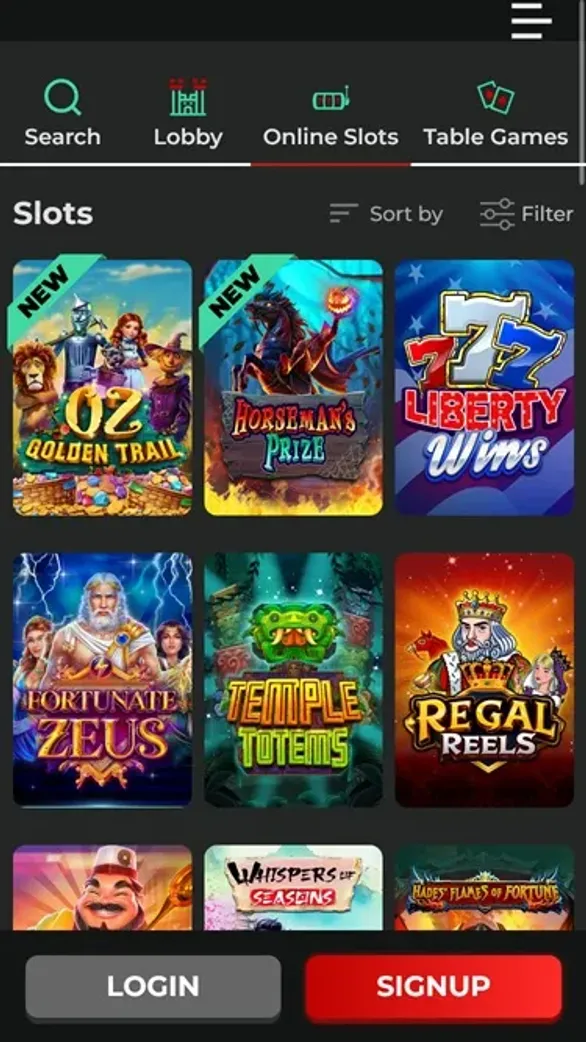
Mobile Browser Gaming

Palace of Chance Casino operates through mobile browsers instead of native apps from Google Play or App Store. The platform automatically adjusts its interface for touch control when you access it through Safari, Chrome, Firefox, or Edge on your device. Technical requirements include enabled JavaScript and cookies for proper functionality.

  • No downloads required from app stores
  • Compatible with all major mobile browsers
  • Automatic interface optimization for touch screens
  • Access to full RTG game library
  • Same account login and banking features as desktop version
Palace of Chance Mobile 24.11.2025. lobby

Bonuses and Promotions

Promo codes need to be added in the cashier before you finalize a deposit. Our main welcome deal uses the code NEVERENDING200 and gives a 200% unlimited signup bonus on first deposits.

Bonus balances come with wagering rules. For slots, keno and scratch cards, the requirement is 30x the bonus amount. For table games and video poker, the playthrough is 60x before withdrawals are possible. You can see your current progress in the account overview.

There are also game restrictions and maximum bet limits while a bonus is active. It is important to read the full terms on the Promotions page in the main menu. If bonus rules are broken, we may remove the bonus together with any winnings from it.

Weekly cashback can reach up to 45% of net losses, provided you deposit at least $30 during that week. Cashback is credited on Mondays.

VIP Club Tiers

Our VIP program has four main levels: Jade, Pearl, Ruby and Diamond. Movement between tiers is based on your total deposits and wagering over time. You can see your current status in the Rewards Club area under your account menu.

With each new tier you receive higher cashback rates and, at the upper levels, a personal account manager plus faster handling of withdrawals. Upgrades are processed automatically when you meet the criteria. If you stay below the required play for several months in a row, a downgrade may follow.

Every deposit from VIP members also counts as an entry into our $1,000 lottery, no matter the amount. Draws run monthly and we share prize information through account notifications.

Rewards Club benefits summary:

Deposit AmountCashbackExtra Perks
Under $10010%Standard lottery
$100-$49912%Enhanced lottery
$500+15%Priority support

Account Settings

On mobile, open the profile icon and go to Settings to change your account details. You can update your password or email, manage marketing messages, and set responsible gaming tools.

Our responsible gaming options include:

  1. Deposit limits with daily, weekly or monthly caps
  2. Session reminders after a chosen period of play
  3. Self-exclusion settings, either temporary or permanent
  4. Reality check pop-ups with time played and balance info

If you lower a limit, the change is instant. Increasing limits has a waiting period of 24 hours. Self-exclusion is usually processed within 24 hours too and cannot be cancelled during the chosen exclusion term.

Security and Performance

All traffic between your device and our servers is protected with SSL encryption. In your browser you should see a padlock icon near the address as an indicator of a secure connection. Login credentials and payment data are sent through these encrypted channels.

We require passwords that meet certain complexity rules, and you can also activate two-factor authentication in your settings. Our system records access attempts with timestamps and IP addresses, which you can review in the security section.

If our monitoring flags suspicious behavior, the account may be locked automatically. In that case you will need to contact support, confirm your identity and possibly upload documents using the secure upload feature before access is restored.

To keep performance stable on mobile, it helps to close unused apps, clear your browser cache from time to time and prefer WiFi where possible. Lowering graphics settings in games and restarting the device occasionally can also improve stability. Using an updated browser version is recommended.

Longer playing sessions can reduce battery faster than normal use. Try to keep an eye on the battery level, plug in for sessions over an hour, and lower screen brightness if needed.

Our Antigua Division of Gaming interactive gaming license carries an annual fee of $100,000, as required for online casino operators under that jurisdiction. Gaming servers are required to be hosted within Antigua under the terms of the license.

Regulatory Notes for Canada

We operate with a gaming license from Antigua, not from Canadian provincial regulators. Canadian players use our services at their own discretion, taking into account the rules that apply in their province.

Our interface and support are available in English only. French is not currently supported. For payments, we do not offer Interac e-Transfer or local Canadian bank transfers. The processing is done by international providers compatible with USD and similar currencies, so your bank may add its own currency conversion fees.

If you prefer desktop, you can access us using a downloadable client for Windows and Mac, which needs around 50MB of storage, or you can stay in instant play mode through desktop browsers. The same login details work on all versions. It is possible to be signed in on several devices at once, but playing from more than one device at the same time may lead to sync issues in your balance or bonus tracking.